Syncing costs with Shopify
Available on: Pro Plus.
Cost sync keeps Shopify's cost per item in step with what Stockie knows you pay. It is off until you turn it on, which is the usual reason a cost updated on a purchase order does not show up in Shopify.
Turning it on
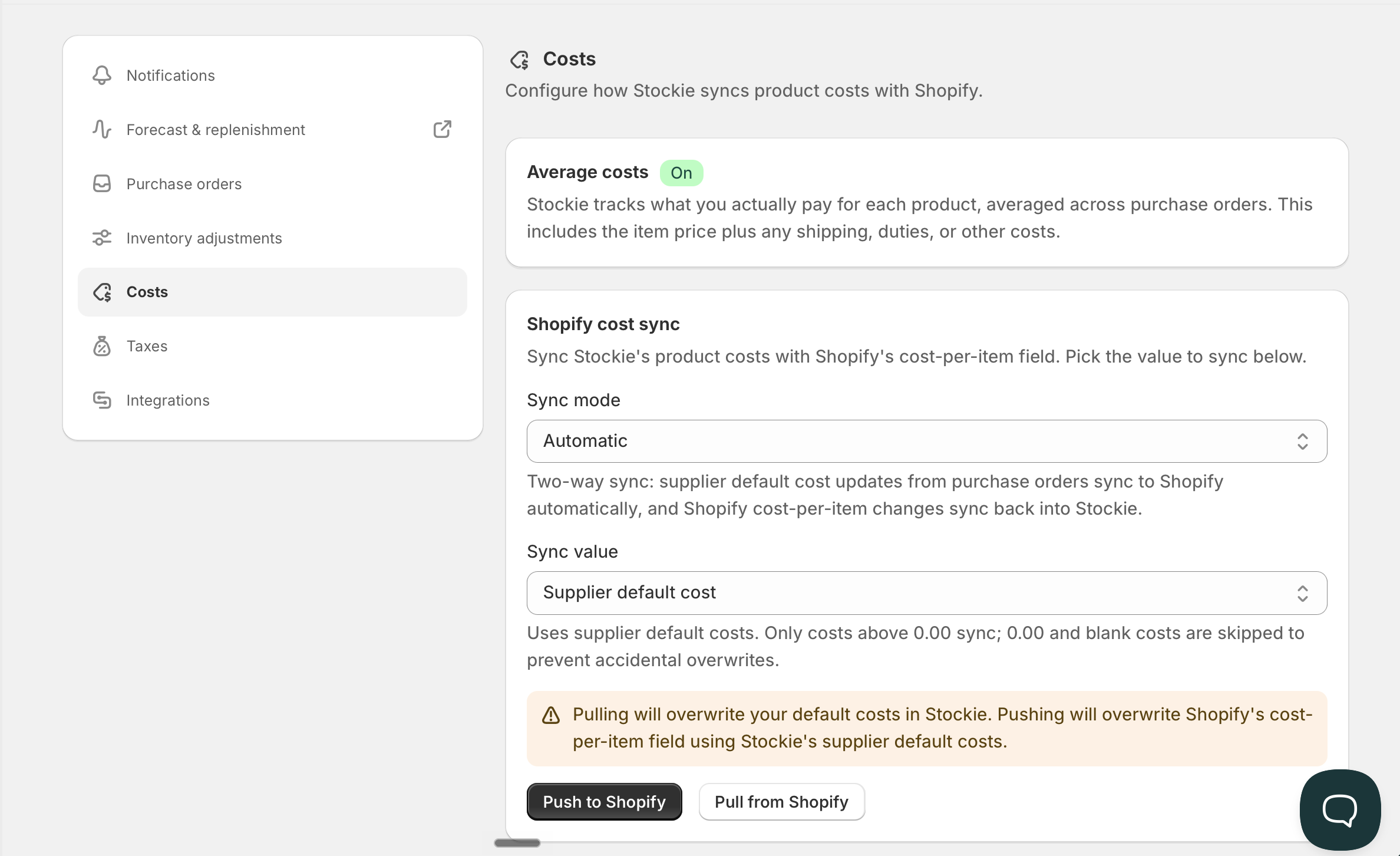
Go to Settings → Costs . Two settings decide what happens:
Sync mode
- Off - nothing is written to Shopify
- Manual - costs sync when you trigger it
- Automatic - costs flow through as they change
Sync value - which cost gets written:
- Supplier default cost - what you pay your supplier
- Average cost - your running weighted average, if average cost tracking is on
Bulk syncing
Push to Shopify writes Stockie's costs out in bulk. Pull from Shopify brings Shopify's costs in, which is the quickest way to seed Stockie from costs you already keep in Shopify.
Pull is only available when your sync value is supplier default cost. Average costs are calculated by Stockie from what you receive, so there is nothing meaningful to pull.
What gets written, and when
With Automatic, a cost you save on a purchase order flows through. The checkmark beside the cost decides whether the edit is saved as that product's default in the first place - see costs on purchase orders.
With Manual, nothing moves until you push.
On Automatic, costs also come back the other way
This catches people out, so it is worth being clear about.
When your sync mode is Automatic and your sync value is supplier default cost, the sync runs in both directions. Change a cost per item in Shopify and Stockie updates that product's default cost to match, without you doing anything.
Supplier costs in a currency other than your store currency are left as they are, both here and when you pull from Shopify. Shopify holds one cost in your store currency, so Stockie doesn't convert it back into a supplier's own currency.
In every other combination it is one way only, Stockie to Shopify:
- On Manual or Off, a cost changed in Shopify is not copied into Stockie
- When your sync value is average cost, the same applies. Your average is calculated from what you receive, so Shopify does not get to overwrite it
If you keep your costs in Shopify and want that to stay the master copy, Automatic with supplier default cost is the setting that does it.
Bulk push and pull have a few requirements
- Cost sync has to be switched on. You cannot bulk push or pull while the mode is Off
- Push needs inventory write access in Shopify, which is a permission someone with app approval rights has to grant
- Only one sync runs at a time. Start another while one is going and Stockie tells you to wait
Zero costs are never written
A zero usually means a cost is missing rather than the item being free, so Stockie will not overwrite a Shopify cost with one.
If a pull says setup is incomplete
Pulling needs your Shopify product sync to have finished, and it needs Stockie to be subscribed to Shopify's cost updates - the same connection that keeps costs in step afterwards. Until both are in place, a pull would hand you figures that go stale immediately, so Stockie asks you to wait instead.
It normally sorts itself out within a few minutes. If it keeps happening, contact us.
Pushing does not depend on any of that, so a push works while a pull is still refusing.