Supplier SKUs
Available on: Pro and above.
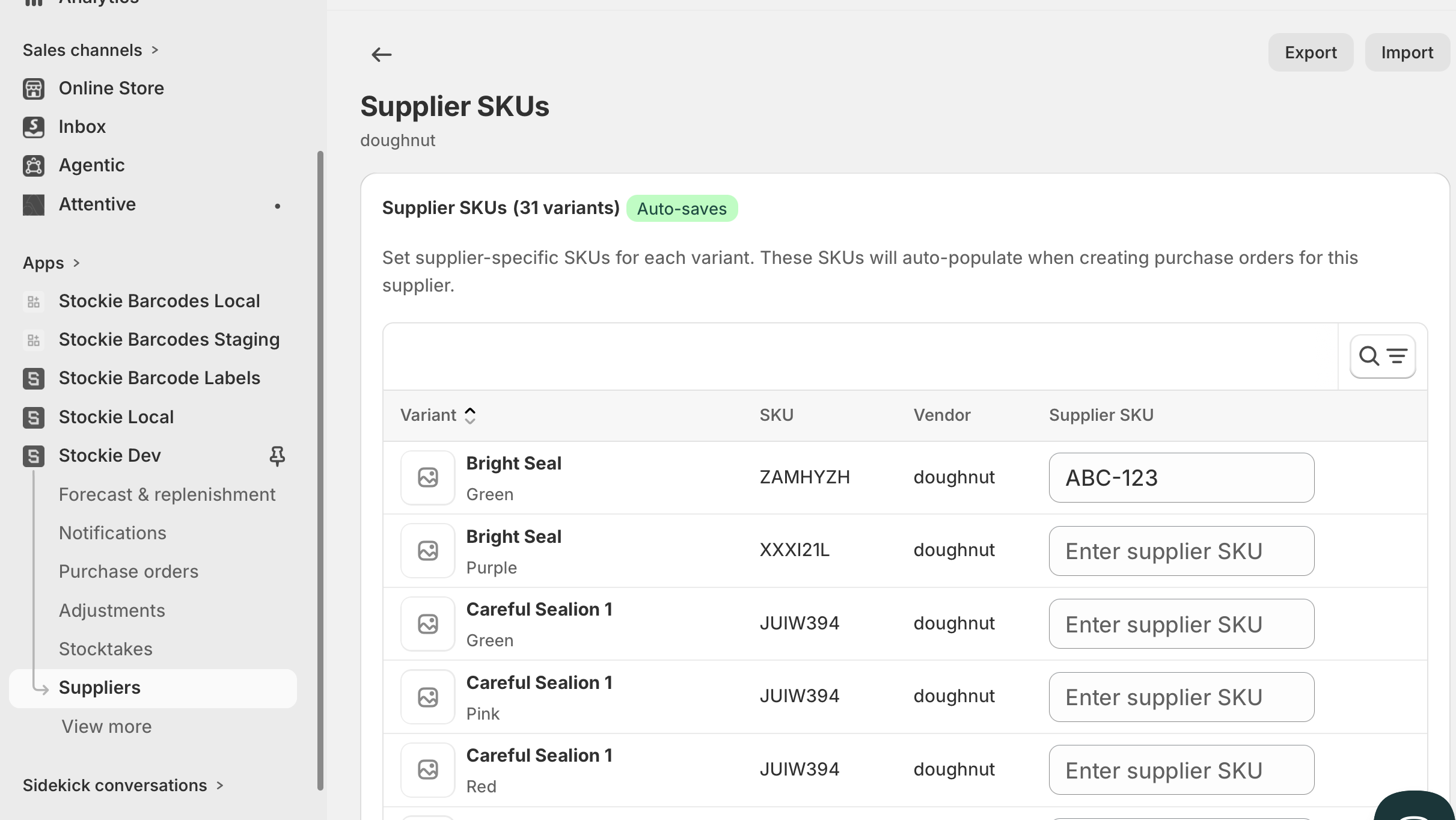
A supplier SKU is the code your supplier uses for a product. Your own SKU identifies it in your store; the supplier SKU identifies it on their order form and invoice.
They are two separate fields, deliberately. Storing the supplier's code means your purchase orders carry the reference they can actually read.
Where supplier SKUs appear
Once stored, a supplier SKU is filled in automatically on that supplier's purchase order lines, and carried into the purchase order exports and PDF you send them.
The same product can carry a different supplier SKU for each supplier you buy it from.
Before you import: assign the products
Supplier SKUs attach to products already linked to the supplier. Assign the products first, or there is nothing for the codes to attach to.
See Setting up suppliers and product assignment.
Importing supplier SKUs
Always start by exporting. The file you import must carry the supplier's own identifier, and exporting is how you get it.
- Go to
Suppliers → [supplier] → Manage → Supplier SKUs. - Click Export. You get a file listing that supplier's assigned products, pre-filled and ready.
- Fill in the SUPPLIER SKU column.
- Click Import and upload it.
The file format
The export gives you the right columns already. If you are assembling a file yourself, it needs:
| Column | Required |
|---|---|
SUPPLIER ID |
Yes - and it must be this supplier's |
SUPPLIER SKU |
Yes |
SKU, BARCODE or VARIANT ID |
One of the three |
The SUPPLIER ID is the reason to export rather than build from scratch. It ties the file to one supplier, so a file exported for one cannot be imported into another and quietly overwrite its codes. If it is missing, the import is refused with a message telling you to export the file for that supplier.
A supplier SKU can be up to 255 characters, and a file can hold up to 100,000 rows.
Matching by barcode
If your supplier works in barcodes rather than SKUs, use the BARCODE column to identify products instead. Any one of SKU , BARCODE or VARIANT ID will match.
This is also the answer when your own SKUs are inconsistent but your barcodes are reliable.
Rows that do not match
Rows are validated individually. A row that cannot be matched to a product, or whose supplier ID does not belong to this supplier, is reported with the row number and the reason - the rest of the file still imports.
Two messages worth recognising:
- SUPPLIER ID does not match this supplier - the file was exported for a different supplier. Re-export from the right one.
- CSV is missing required column: SUPPLIER SKU - the column is absent or renamed. Export a fresh template and copy your codes into it.
Clearing a supplier SKU
Leave the SUPPLIER SKU cell empty on a row to remove a code you have already stored. The import reports cleared rows separately from updated ones.